


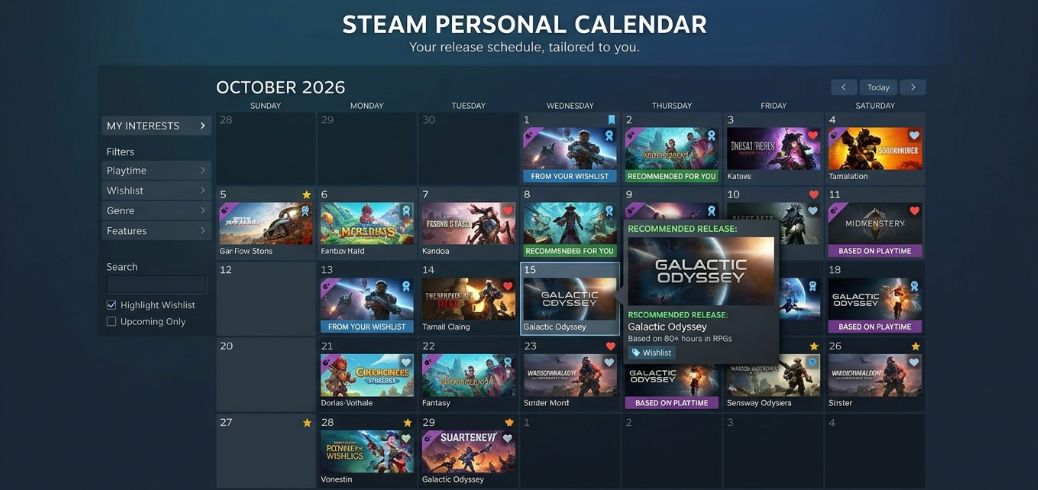
The Steam Personal Calendar feature explained simply is a personalised game discovery tool from Valve. It shows upcoming and recently released games based on your gaming interests. Instead of displaying every new release, Steam recommends titles you might enjoy. It uses your playtime, similar players’ interests and wishlist activity to build a calendar tailored to you. You can also adjust filters and explore games scheduled to launch in the coming weeks.
Valve officially made the Personal Calendar a permanent Steam Store feature in October 2026. Previously, it was available through Steam Labs as an experimental tool. Now, players can access it directly from the Steam homepage.
What Is the Steam Personal Calendar Feature?
The Steam Personal Calendar is a recommendation system that organises game releases by date. Its main purpose is to help players discover games that match their interests.
Steam already offers discovery tools, including the Discovery Queue and Popular Upcoming section. However, these tools serve different purposes.
The Personal Calendar focuses on games launching soon or released recently. It also considers what you enjoy playing rather than relying only on popularity.
For example, someone who regularly plays strategy games might see upcoming city builders or tactical games. Meanwhile, a player who prefers survival adventures may receive different suggestions.
As a result, two Steam users can open the same calendar and see different recommendations.
How Does the Steam Personal Calendar Work?

Steam’s Personal Calendar uses an automated recommendation system. It examines gaming behaviour and identifies titles that may interest individual players.
Recommendations Based on Your Playtime
Playtime is one of the most important signals. Steam looks closely at games you spend significant time playing.
For instance, playing a strategy game for several hours may influence future suggestions. However, briefly testing an unfamiliar game should have less impact.
This approach helps Steam understand your lasting interests rather than treating every game equally.
Finding Players With Similar Gaming Interests
Steam also compares your gaming habits with those of other players.
The system identifies people with similar playtime patterns. It then examines games those players have wishlisted or played.
Imagine you regularly enjoy simulation games. Steam may identify other players who spend similar amounts of time on those titles.
If those players wishlist an upcoming simulator you have not discovered, Steam may recommend it.
Therefore, you can find games beyond the titles you already follow.
Organising Games by Release Date
After selecting suitable titles, Steam places them on the calendar according to their release dates.
This makes upcoming launches easier to understand. You can quickly identify which games arrive soon and which releases are further away.
In addition, recently launched games may appear if they match your interests.
How to Access the Steam Personal Calendar
You can access the Personal Calendar through the Steam Store homepage or its dedicated calendar page.
Open It From the Steam Store
Launch Steam and visit the Store section.
Look for the Personal Calendar among the homepage recommendations. The section displays selected game releases across a shorter period.
You can explore these suggestions or open the full calendar for a wider view.
Steam also includes the Personal Calendar in the Recommended tab of Big Picture Mode.
Explore the Full Calendar
The dedicated Personal Calendar provides a broader overview of game releases.
It covers an eight-week period, making it useful for planning future purchases.
Meanwhile, the homepage provides a smaller preview covering recent weeks and upcoming releases.
You can select individual games to open their Steam Store pages. There, you can check descriptions, screenshots, reviews and available purchase information.
Steam Personal Calendar Features Explained
The Personal Calendar offers several options to make game discovery more useful.
Personalised Upcoming Game Recommendations
The main feature is its tailored selection of games.
Instead of showing only major releases, Steam can recommend smaller games that match your interests.
This is particularly helpful for players who enjoy independent games or less popular genres.
Because the system considers similar players, it can uncover titles you might otherwise miss.
Genre and Theme Filters
Steam allows players to refine their calendar using genre and theme tags.
For example, you can focus on particular types of games rather than browsing every recommendation.
These filters help reduce unwanted results. They also make the calendar easier to explore when many games have similar release dates.
Wishlist Integration
Games already on your Steam wishlist can appear automatically.
This helps you remember upcoming releases you previously saved.
However, you can choose to hide wishlisted games if you want to focus on new discoveries.
The calendar therefore works both as a recommendation tool and a release reminder.
Early Access and DLC Options
The calendar can include games leaving Early Access and moving towards their full release.
It can also recommend downloadable content, commonly called DLC, when you own the relevant base game.
Additionally, filtering options help you exclude certain types of content.
These controls are useful if you prefer complete games over Early Access releases.
How to Customise Your Steam Personal Calendar
You can adjust the calendar to make recommendations more relevant.
Start by opening the full Personal Calendar. Then, review the available display and filtering options.
Adjust the Number of Games Displayed
The calendar lets you change how many recommended games appear.
Displaying more titles gives you a broader selection. However, fewer recommendations can make the page easier to browse.
Choose whichever view suits your preferences.
Refine Your Recommendations
Use the available genre and theme filters to narrow the results.
You can also hide games you already own or adjust how wishlisted titles appear.
If you mainly want brand-new releases, consider filtering out Early Access content.
These settings help you focus on games that are genuinely useful to you.
How Often Does Steam Update the Personal Calendar?
Steam refreshes its Personal Calendar recommendations daily.
However, this does not mean every game changes each day.
Valve regularly updates its recommendation system using newer player activity and wishlist information.
As a result, you may gradually notice different suggestions as your gaming habits change.
Release date updates can also affect what appears.
For example, a game with a newly confirmed launch date may become eligible for the calendar.
How Is the Personal Calendar Different From Steam Discovery Queue?
The Personal Calendar and Discovery Queue both recommend games, but they approach discovery differently.
The Discovery Queue helps players browse titles they may find interesting. These recommendations are not limited to upcoming releases.
In contrast, the Personal Calendar focuses on release timing.
It combines personalised recommendations with a dated view of recent and upcoming games.
This makes it especially useful when you want to know what is launching next.
Meanwhile, the Popular Upcoming section focuses more on games attracting broad interest.
The Personal Calendar can highlight less widely known titles because recommendations depend on individual gaming preferences.
Why the Steam Personal Calendar Matters for Indie Games
The Personal Calendar offers independent developers another opportunity to reach interested players.
A smaller game does not necessarily need widespread popularity to appear.
Instead, Steam looks for players whose interests match that title.
Developers still need an eligible Steam Store page with a specific, visible release date.
Wishlists also matter because the system uses player interest to identify suitable recommendations.
However, Valve does not require a fixed minimum number of wishlists.
Importantly, developers cannot buy placement on the Personal Calendar. Recommendations are generated automatically rather than selected through paid promotion.
Does the Steam Personal Calendar Have Any Limitations?
The Personal Calendar is useful, but it cannot predict every player’s interests perfectly.
Its recommendations depend on available gaming activity and related signals.
Therefore, players with limited playtime may find that some suggestions do not match their preferences.
The calendar also does not display every upcoming Steam game.
Furthermore, its weekday layout places Saturday and Sunday releases on the following Monday.
Games without a specific public release date may also be missing.
For these reasons, it works best alongside Steam search, wishlists and other discovery features.
Conclusion
The Steam Personal Calendar feature explained in this guide offers a practical way to discover upcoming PC games.
It combines personalised recommendations, wishlist activity and release dates in one convenient view.
You can also refine the results using filters and explore smaller titles that might otherwise go unnoticed.
For regular Steam users, checking the calendar can make finding their next game easier and more enjoyable.
FAQs
Is the Steam Personal Calendar free to use?
Yes, the Steam Personal Calendar is a free feature of the Steam Store. You do not need a separate subscription to explore its game recommendations. However, individual games may still require payment. The calendar simply helps you discover relevant releases and visit their store pages.
Can I use the Steam Personal Calendar on mobile?
Yes, you can access the Personal Calendar through Steam’s web-based store experience on supported mobile browsers. Its recommendations are connected to your Steam gaming interests. However, the layout may differ from the desktop version because smaller screens provide less viewing space.
Does Steam Personal Calendar show every upcoming game?
No, the Personal Calendar does not show every upcoming Steam release. It selects games that its recommendation system considers relevant to your interests. You can adjust filters and display settings to explore more suggestions. For a broader release search, use Steam’s other browsing tools.
Can I remove unwanted games from my Steam Personal Calendar?
You can refine the displayed results using the available filters. For example, you can hide wishlisted games, exclude owned titles and adjust genre preferences. However, these controls do not necessarily provide a permanent way to remove every individual recommendation from future calendar results.
Does adding games to my wishlist affect recommendations?
Yes, wishlist activity plays an important role in Steam’s Personal Calendar. Games on your wishlist can appear automatically as release reminders. Steam also uses wishlist behaviour from players with similar gaming interests to recommend titles. However, your recommendations are not based on your own wishlist alone.
Is the Steam Personal Calendar better than the Discovery Queue?
Neither feature is better for every situation. The Personal Calendar is particularly useful for tracking recent and upcoming releases. Meanwhile, the Discovery Queue helps you browse recommended games more generally. If you want to discover future launches, the Personal Calendar may be the more suitable choice.
For more updates visit: DAILY FRONT

Other Articles




No Comment! Be the first one.